How To Program A Martin Garage Door Opener?

Rabia Tingat • September 16, 2024

Martin garage door openers are known for their reliability, smooth operation, and user-friendly design. If you've recently installed a Martin garage door opener or need to reprogram an existing one, learning how to program it correctly is essential for ensuring that your door operates efficiently and securely. In this guide, you'll learn how to sync a new remote, reset an old one, or program your garage door opener for the first time.


Why You Might Need to Program Your Martin Garage Door Opener


There are several common reasons why you might need to program your Martin garage door opener:

  1. New Remote Control: If you've purchased a new remote control, you’ll need to sync it with the opener.
  2. Reprogramming After Power Outage: Sometimes after a power outage, you may need to reprogram the opener to restore full functionality.
  3. Changing Security Codes: For security reasons, it’s smart to occasionally change the code, especially if you lose a remote or move into a new home.
  4. Adding a Keypad or New Accessories: If you’ve installed an exterior keypad or other accessories, they’ll need to be synced with the opener as well.


Before You Begin: Safety First


Before programming your Martin garage door opener, ensure safety by taking the following precautions:

  • Disconnect the Power: Unplug the garage door opener to avoid any potential electrical mishaps.
  • Close the Door: Ensure the garage door is fully closed before starting the programming process.
  • Have Your Remote Ready: If you are syncing a new remote, make sure the battery is installed and functioning.


Step-by-Step Guide to Programming a Martin Garage Door Opener


Each model of Martin garage door opener may vary slightly, but most follow similar programming steps. Here’s a comprehensive guide on how to program a Martin garage door opener.


Step 1: Locate the “Learn” Button

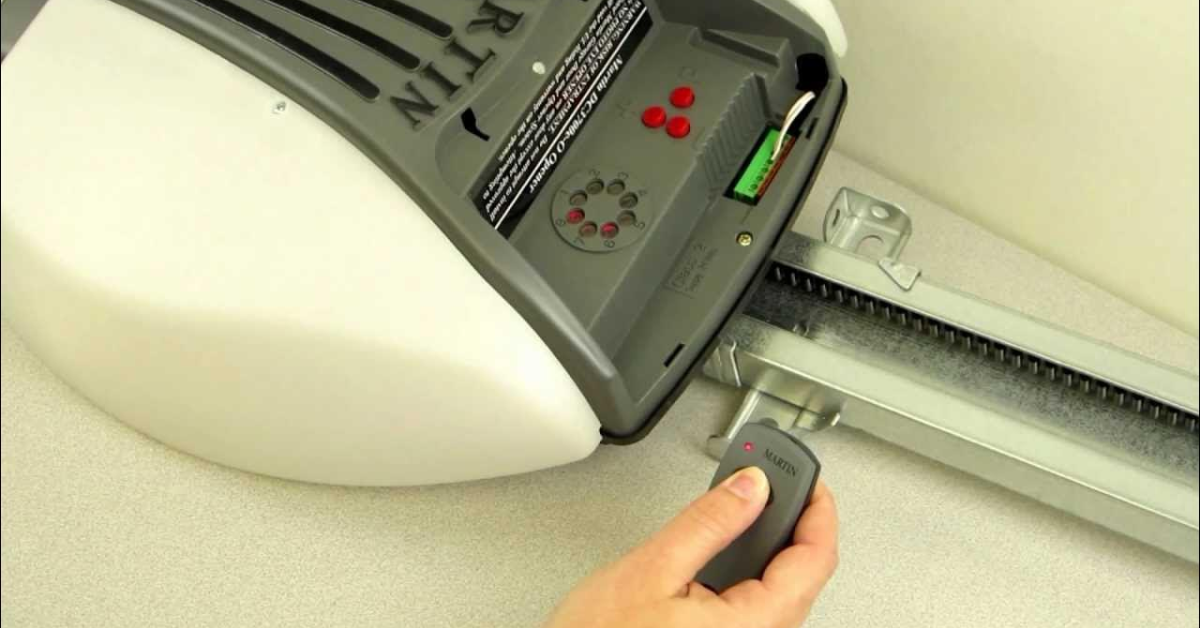
To start the programming process, locate the “Learn” button on the motor unit of your Martin garage door opener. This button is usually found near the antenna wire, which hangs down from the motor. You may need to remove the light cover to find the button, depending on your specific model.

The “Learn” button is crucial for syncing remotes and keypads with the garage door opener.


Step 2: Press the “Learn” Button

Once you’ve located the “Learn” button, press and release it. A light on the motor unit will turn on or blink, indicating that the opener is in learning mode. You typically have about 30 seconds to program the remote or keypad before the system exits learning mode.


Step 3: Program the Remote Control

After pressing the “Learn” button, grab the remote control you wish to sync. Press the button on the remote that you want to use to open the garage door. Hold it down for a few seconds until you hear a click or the garage door opener light blinks. This confirms that the remote has been successfully programmed.


If the light doesn’t blink or the door doesn’t respond, you may need to try again, making sure the remote is within range of the opener.


Step 4: Program the Keypad (Optional)


If you’re adding or reprogramming an exterior keypad, follow these steps:

  1. Press the “Learn” button on the garage door opener motor unit.
  2. On the keypad, enter the four-digit PIN you want to use to operate the garage door.
  3. Press the "Enter" button on the keypad.
  4. The motor unit will blink or click to indicate that the code has been accepted.

You should now be able to open and close the garage door using your newly programmed keypad.


Step 5: Test the System


Once you’ve programmed the remote control and/or keypad, it’s time to test the system. Press the button on the remote to see if the garage door opens and closes as expected. If you’ve programmed a keypad, enter your PIN and press “Enter” to ensure the door responds.


Step 6: Troubleshooting Common Issues


If the garage door opener does not respond to your remote or keypad after programming, consider the following troubleshooting tips:

  • Check the Batteries: Ensure that the batteries in your remote or keypad are fresh and functioning properly.
  • Recheck the Range: Make sure you are standing within a reasonable range of the garage door opener while programming the remote. If you’re too far away, the signal may not reach the opener.
  • Reprogram the Device: If the opener still doesn’t respond, you may need to repeat the programming steps. Double-check that you are pressing the right buttons and following the instructions carefully.
  • Reset the Opener: If you’ve tried multiple times and still can’t sync the remote or keypad, you may need to reset the garage door opener and start fresh.


How to Reset a Martin Garage Door Opener


Sometimes, a complete reset is necessary, especially if multiple remotes or devices are not working. Here’s how to reset the opener:

  1. Locate the “Learn” button on the garage door opener motor unit.
  2. Press and hold the “Learn” button for approximately 10 seconds until the LED light goes off. This will erase all programmed remotes and keypads from the opener’s memory.
  3. After resetting, you will need to reprogram all your remotes and keypads using the steps outlined above.


Maintaining Your Martin Garage Door Opener


To ensure your Martin garage door opener continues working smoothly, follow these maintenance tips:

  • Regularly Inspect Moving Parts: Check the motor unit, springs, and cables for any signs of wear and tear. Address any issues promptly to avoid malfunctioning.
  • Lubricate the Tracks: Keep the garage door tracks, rollers, and hinges lubricated to reduce noise and prevent friction-related damage.
  • Test the Safety Sensors: Make sure the safety sensors are aligned and working correctly. These sensors prevent the door from closing if there’s an obstruction in the doorway.
  • Check the Battery Life: Ensure the batteries in your remotes and keypads are in good condition, replacing them as needed.


Conclusion

Programming a Martin garage door opener is a simple process that takes just a few minutes. Whether you’re syncing a new remote, adding a keypad, or resetting the system, following the steps outlined in this guide will help ensure your garage door operates efficiently and securely. Remember to test the system after programming and follow basic maintenance tips to extend the life of your garage door opener.
You might also like

Fix N Go Blog
How Often Should Commercial Garage Doors Be Serviced?
By Rabia Tingat February 20, 2026
Learn how often commercial garage doors should be serviced, ideal maintenance schedules by usage, what a tune-up includes, and signs you need repairs fast.
How Often Should Commercial Garage Doors Be Replaced?
By Rabia Tingat February 20, 2026
If you manage a warehouse, service bay, loading dock, or retail backroom, your overhead doors are working harder than most people realize. They open and close dozens of times a day, take hits from forklifts, battle weather, and still need to seal and operate safely. So it’s natural to ask: how often should commercial garage doors be replaced? There isn’t one perfect number, because commercial doors “age” based on cycles, environment, and how well they’re maintained. Still, there are practical timeframes you can use for planning and budgeting. In most facilities, a commercial garage door lasts about 15–30 years, but high-cycle locations may need replacement much sooner—sometimes in 8–15 years—especially if safety, downtime, and energy loss become costly. This guide breaks down typical commercial garage door lifespan by door type, the signs that replacement is smarter than repair, and how to make a decision that protects operations. What Determines a Commercial Garage Door’s Lifespan? Before we talk timelines, it helps to understand what really wears out. In commercial settings, the door panels often survive longer than the moving parts. The parts that usually drive replacement decisions include: Springs and cables (cycle-related wear) Rollers and hinges (friction and alignment) Tracks (impact damage and shifting) Bottom seal and perimeter weathering Operator/motor compatibility and safety systems The biggest factor is usually cycle count—how many times the door opens and closes. A door at a busy dock might run 80–200 cycles per day, while a storage facility door might run 5–15 cycles. That difference alone can cut years off the system. Typical Replacement Timelines by Door Type Sectional steel overhead doors (common in warehouses) These are durable and repair-friendly. With consistent commercial door maintenance, many facilities get 15–25 years, sometimes more. If you run high daily cycles or deal with corrosion, replacement may come earlier. Rolling steel doors (often used for security) Rolling steel doors can last 20–30 years, but they need proper alignment and regular service. Heavy use and impacts can shorten lifespan. High-speed doors (fabric, rubber, or fast-acting sectional) High-speed doors are designed for cycle-heavy environments, but they may need major component replacement sooner due to constant motion and sensor reliance. Many operators plan for 10–15 years depending on environment and usage. Dock doors and loading bay doors Dock doors take the most abuse: pallets, trucks, forklifts, and constant openings. Even with good upkeep, dock door replacement planning often lands around 10–20 years, sometimes sooner in high-impact facilities. How Often Should Commercial Garage Doors Be Replaced in High-Traffic Facilities? If your door is part of daily operations—shipping, receiving, fleet service, or temperature-controlled movement—replacement schedules usually tighten. Here’s a realistic way to think about it: Low traffic (under 20 cycles/day): replacement often 20–30 years Moderate traffic (20–60 cycles/day): replacement often 15–25 years High traffic (60+ cycles/day): replacement often 8–15 years , depending on upkeep and damage High traffic doesn’t always mean the door panels fail. It means the system becomes costly to keep alive: frequent spring changes, constant roller wear, downtime from sensor or track issues, and growing energy loss from poor sealing. In these environments, replacement becomes less about age and more about operational efficiency. The Clear Signs It’s Time to Replace (Not Just Repair) A commercial door can be repaired many times, but at a certain point, repairs stop making sense. You’ll usually know replacement is near when you see these patterns. 1) You’re paying for repeated “same problem” repairs If you’re calling service repeatedly for: tracking issues roller failures cables slipping bottom seal tearing operator strain and limit problems …it’s a sign the door system is aging out or the structure is compromised. 2) Door panels are bent, cracked, or no longer sealing Panels that are bowed or dented can still open and close, but they often: scrape tracks leak air and pests increase operator load fail under wind pressure If sealing problems affect climate control, replacement can pay for itself faster than expected. 3) Your operator and safety features are outdated Modern facilities rely on photo eyes, edge sensors, monitored safety devices, and reliable reversing systems. If your door system can’t support safe operation consistently—or if parts are hard to source—an overhead door upgrade may be the safer choice. 4) Rust, corrosion, or rot is spreading Once corrosion starts affecting key areas (bottom sections, hinges, fasteners), repairs become temporary patches. Coastal areas and chemical-exposure environments reach this stage faster. 5) Downtime is costing more than the door This is the most business-focused indicator. If door breakdowns interrupt shipments, block bays, delay fleets, or create safety risks, replacement becomes a productivity decision—not just a maintenance one. Repair vs Replace: A Practical Decision Framework Instead of guessing, use this simple logic: Repair makes sense when the door is structurally sound, the issue is isolated (springs, rollers, sensor alignment), and service calls are infrequent. Replacements make sense when damage is structural, service calls are frequent, parts are hard to find, or energy/downtime costs keep rising. A common rule facility managers use: if you’re spending a large percentage of the door’s replacement cost every year just to keep it operating, replacement should be on the table. Even without exact percentages, you’ll feel it in recurring invoices and repeated disruptions. Commercial Door Maintenance That Extends Replacement Timing If you want to push replacement further into the future, maintenance matters more than brand. The best routine focuses on preventing friction, misalignment, and safety failures. What helps most: scheduled inspections (not just “fix when broken”) tightening hardware and checking track alignment replacing worn rollers before they damage tracks keeping seals intact to reduce strain and heat loss checking spring condition and balance regularly A well-maintained door often lasts years longer because it avoids the “domino effect” where one worn part damages several others. Examples: When Replacement Is the Better Business Move Example 1: Busy loading dock A distribution center runs dock doors constantly. Repairs are frequent, and trucks wait when a door jams. Even if the door is only 12 years old, replacement may be smarter because downtime affects deliveries and labor costs. Example 2: Climate-controlled warehouse A facility stores temperature-sensitive products. The door still works but leaks air badly and struggles to close smoothly. The energy loss and equipment strain may justify replacement earlier than expected. Example 3: Service bays for fleet vehicles A door with dented panels and worn tracks becomes a safety hazard. Even if it “works,” it’s risky around staff and vehicles. Replacing prevents injuries and property damage. Cost Factors to Consider (Beyond the Door Price) Replacement decisions aren’t only about purchase price. Consider: installation time and scheduling around operations upgrading the operator or controls insulation value and energy savings security improvements reduced maintenance and fewer service calls Sometimes a newer, better-sealing door can reduce heating/cooling loss enough to matter in monthly operating costs—especially for large openings. Conclusion So, how often should commercial garage doors be replaced? In many facilities, the realistic lifespan is 15–30 years, but high-traffic or harsh environments may require replacement closer to 8–15 years. The best time to replace is usually when repairs become repetitive, safety and sealing are declining, and downtime starts affecting daily operations. If you’re unsure, don’t wait for a failure. Plan ahead, evaluate cycle count and repair history, and treat replacement as an operational upgrade—not just a maintenance expense.
Why Won’t My Commercial Garage Door Open or Close?
By Rabia Tingat February 16, 2026
Commercial garage door not opening or closing? Learn the most common causes, quick checks, safe fixes, and when to call a pro.